
Microsoft 365 Licensing Explained: Choosing the Right Plan for Your Business in 2026
Panda Informatics | Microsoft 365 Optimization
Microsoft 365 licensing confuses even experienced IT buyers. Overlapping tiers, cryptic plan names, and add-ons that duplicate features you may already own make it easy to overpay or under-provision. The July 2026 price increase raised the stakes: most commercial plans now cost more, and the wrong license mix quietly drains budget every month.
This guide cuts through the complexity. You will learn what each plan actually includes, how the 2026 pricing changes affect your decision, and how to match licenses to roles instead of defaulting everyone to one tier. Whether you run a 20-person firm in Manchester, a 150-seat company in Sydney, or a growing team in Chicago, the framework is the same.
The 2026 Licensing Landscape: What Changed
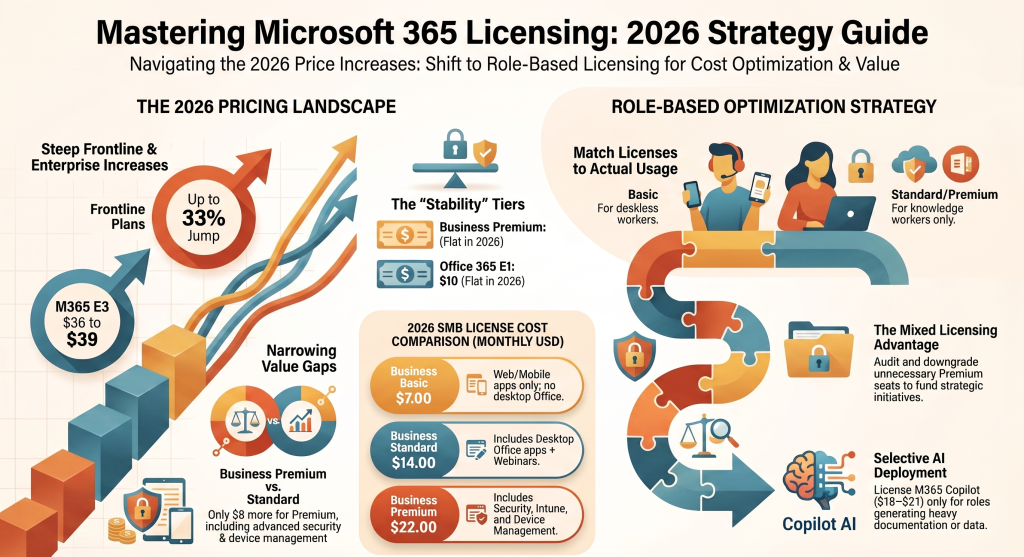
Microsoft raised prices across most commercial plans on July 1, 2026. The increases are uneven, ranging from zero to significant, so a blanket assumption about cost is dangerous.
Here are the new US list prices, per user per month on an annual commitment:
- Business Basic rose from $6.00 to $7.00, a 16.7% increase
- Business Standard rose from $12.50 to $14.00, a 12% increase
- Business Premium held flat at $22.00, with no change
- Office 365 E1 held flat at $10.00; Office 365 E3 rose from $23.00 to $26.00
- Microsoft 365 E3 rose from $36 to $39; E5 tiers increased in the 5 to 8 percent range
- Frontline plans F1 and F3 saw the steepest percentage jumps (33% and 25%), though they remain the lowest absolute prices
Two facts drive smart decisions here. First, Business Premium and Office 365 E1 are the only plans holding flat, which deliberately narrows the price gap between Business Standard and Business Premium. Second, existing customers keep current pricing until their next renewal after July 1, and the new bundled features apply regardless.
Microsoft 365 Business Plans Explained
Business plans suit organizations up to 300 users. This covers most SMBs.
Business Basic
Web and mobile Office apps, Exchange email, Teams, SharePoint, and OneDrive. No desktop Office applications.
Best for: frontline staff, deskless workers, or anyone who lives in a browser and does not need installed Word, Excel, or PowerPoint.
Business Standard
Everything in Basic plus the full desktop Office suite, plus webinar hosting and bookings tools.
Best for: knowledge workers who need desktop Office and offline access. This is the default productivity tier for most office-based teams.
Business Premium
Everything in Standard plus a security and device-management layer: Microsoft Intune, Microsoft Defender for Business, Azure Information Protection, and Conditional Access.
Best for: organizations handling sensitive data, managing company devices, or currently paying for separate security and MDM tools. With Premium now only $8 above Standard on the US list, buying separate security products often costs more than upgrading. Microsoft also introduced Purview for Business at $10 per user per month, adding data loss prevention, Insider Risk Management, eDiscovery Premium, and advanced auditing without enterprise complexity.
Enterprise Plans: E1, E3, E5
Enterprise plans remove the 300-user cap and add advanced compliance, analytics, and security.
- Office 365 E1: Web-based, no desktop apps, flat at $10. A budget enterprise-scale option.
- Microsoft 365 E3: Desktop apps, advanced security, device management, and compliance at scale. Now includes Defender for Office 365 Plan 1 plus expanded Intune capabilities like Remote Help and Advanced Analytics.
- Microsoft 365 E5: Everything in E3 plus advanced threat protection, advanced compliance, Power BI Pro, and phone system capabilities. Now also includes Security Copilot.
Choose Enterprise when you exceed 300 users, need advanced compliance frameworks, or require the analytics and voice capabilities bundled into E5.
Frontline Plans: F1 and F3
Built for shift, field, and frontline staff who need communication and basic productivity without full Office. F1 and F3 saw the largest percentage increases in the commercial catalog but remain the lowest absolute prices in Microsoft 365.
Best for: retail, manufacturing, logistics, hospitality, and healthcare frontline teams.
The Add-Ons That Matter
Two add-ons dominate 2026 buying decisions:
- Microsoft 365 Copilot for Business: AI across SharePoint, OneDrive, Outlook, and Teams, listed at a promotional $18 per user per month with a standard price of $21. A separate purchase, not bundled into any base plan.
- Purview for Business: Compliance and data protection for Business Premium customers at $10 per user per month.
Add these only where they deliver value. AI on every seat is rarely justified; license Copilot for roles that generate documents, analyze data, or manage heavy communication.
How to Choose the Right Plan
Match the license to the role, not the org chart. Work through these questions:
- Does this user need desktop Office? No means Basic. Yes moves to Standard or higher.
- Does this user handle sensitive data or use a managed device? Yes points to Business Premium.
- Do we exceed 300 users or need advanced compliance and voice? Yes moves to Enterprise E3 or E5.
- Is this user frontline or deskless? Consider F1 or F3.
- Does this specific role benefit from AI? Add Copilot selectively, not universally.
The Mixed Licensing Model: Best Practice
Assigning one plan to everyone is the most common and most expensive mistake. The best approach is to match licenses to roles rather than choosing one plan for everyone, with higher-risk roles on Business Premium and other users on Standard or Basic.
A practical example: a sales rep who only uses Outlook and Teams does not need Business Premium. Placing that rep on Business Basic at $6 instead of Premium at $22 is a common audit finding that saves real money. Multiply that across a team and the savings fund your Copilot rollout.
License Optimization: Cut Waste Before You Renew
Before your next renewal, run a license audit. Common findings include shared mailboxes with paid licenses attached, departed employees still occupying licenses, and users over-licensed for their actual usage. The Microsoft 365 admin center surfaces this data under usage reports; CSP reseller portals often provide better tooling.
Then consider timing. Microsoft typically allows renewing a few months early at current pricing, which locks in a year of pre-increase rates. This is the highest-leverage move available and most SMBs do not know it exists. Model it against your seat count before acting, since an early renewal can also lock in an unoptimized plan mix.
A Note on Global and Regional Pricing
The figures above are US list prices. Microsoft applies local currency pricing across the UK, Europe, and Australia, so your per-user cost will differ and can shift with currency normalization. Always confirm pricing in your billing currency with your reseller or the Microsoft admin center. Government plan increases above 10% are being phased in over multiple years, which matters for public-sector buyers. The plan structure, feature tiers, and decision logic remain identical worldwide; only the numbers change.
Conclusion
Microsoft 365 licensing rewards precision and punishes defaults. The 2026 price increase makes a role-based licensing strategy more valuable than ever, particularly with Business Premium now sitting close to Standard and bundling security tools you might otherwise buy separately.
Three takeaways to act on:
- Match licenses to roles. A mixed model of Basic, Standard, and Premium almost always beats a single-tier rollout.
- Audit before you renew. Reclaim licenses from departed users, shared mailboxes, and over-provisioned staff. This alone often offsets the price increase.
- Reassess Business Premium. With the narrowed price gap and bundled security, it is now the strongest value tier for any team handling sensitive data or managed devices.
Licensing is not a set-and-forget decision. Review it at every renewal, align it to how people actually work, and you will control cost while giving each user exactly what they need.