
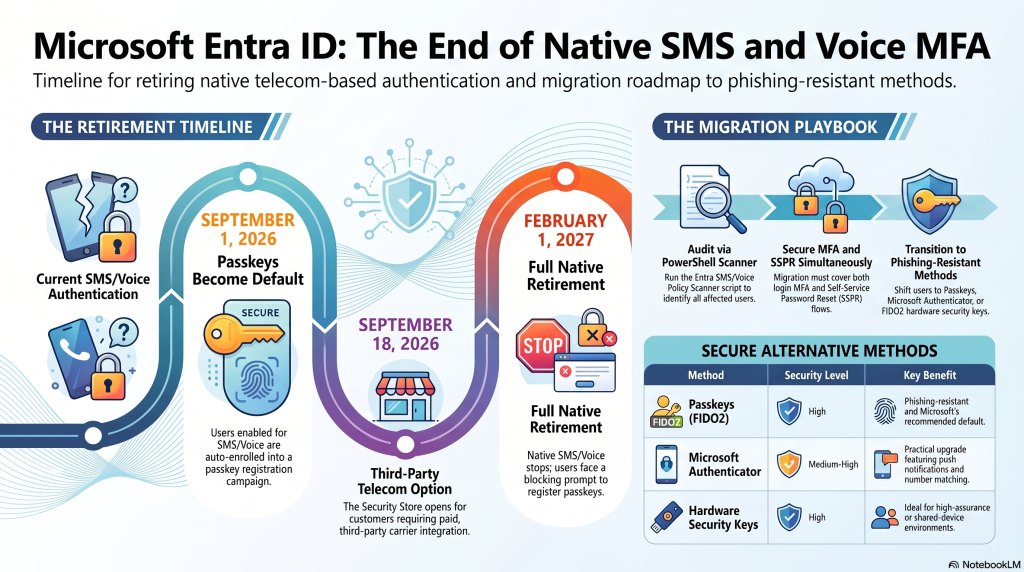
Microsoft Is Retiring SMS and Voice MFA
Microsoft is pulling the plug on native SMS and voice multi-factor authentication in Microsoft Entra ID. This is not a soft deprecation buried in release notes. It is a hard retirement of Microsoft-operated telecom delivery, with fixed dates and a blocking enforcement prompt that cannot be skipped.
If your organization still uses text messages or phone calls for MFA or self-service password reset, you are on the clock. This post breaks down exactly what changes, when, who is affected, why Microsoft is doing it, and the concrete steps to migrate before disruption hits.
Primary keyword: Microsoft retiring SMS and voice MFA Target audience: IT managers, M365 admins, SMB decision-makers, security leads Search intent: Understand the change, the timeline, and the required action
What Microsoft Actually Announced
In message center notice MC1426371, Microsoft confirmed two linked changes to authentication in Entra ID.
First, passkeys become the default sign-in experience. Second, Microsoft exits telecom-delivered SMS and voice authentication entirely. After the retirement date, these are no longer a native Entra capability.
The critical nuance most summaries miss: the method does not disappear. Microsoft is getting out of the telecom business. Organizations that genuinely need phone-based MFA must contract a third-party telecom provider through the Microsoft Security Store and pay the associated carrier charges. Microsoft stops delivering the messages itself.
The Timeline You Need to Plan Around
Microsoft is using a phased rollout. Three dates matter.
September 1, 2026: Passkeys become default
Any user currently enabled for SMS or voice in the Entra Authentication Methods Policy (AMP) is auto-enabled for passkeys. Your Registration Campaign settings are forcibly switched to Microsoft-managed state, pulling these users into scope automatically.
At their next sign-in requiring MFA, affected users get nudged to register a passkey. At this stage, the prompt is skippable, with unlimited snoozes, unless admins disable snoozing. If you do not want this auto-enablement, you must move users out of SMS or voice AMP before this date.
September 18, 2026: Telecom provider details open
Microsoft opens the Security Store details for customer-managed telecom providers. These are third-party carriers admins can contract to keep SMS and voice codes flowing after Microsoft steps out. This route exists for organizations with genuine regulatory or business constraints.
February 1, 2027: Full retirement and hard enforcement
Microsoft retires its own telecom delivery for SMS and voice. These stop being a native Entra capability across the board.
If a tenant still has users enabled for Microsoft-managed SMS or voice on this date, and no customer-managed telecom provider is configured, those users can no longer use SMS or voice to satisfy MFA. Users whose only available method is SMS or voice hit a blocking passkey-registration prompt at sign-in. There is no opt-out. It applies to every tenant.
Who Is Affected (Wider Than You Think)
Two scoping details cause the most confusion.
Enabled, not registered. You are in scope if users are enabled for SMS or voice in the Authentication Methods Policy or in the legacy per-user MFA settings. This is about being enabled for the method, not merely having a phone number on file. A user with an unused registered number but the method disabled is not in scope; a user enabled for the method who has never used it is.
It hits SSPR too. The retirement applies across Entra, including self-service password reset. If users currently reset passwords via text message, that flow breaks the same way. Teams often audit MFA and forget SSPR entirely, then get caught out.
Why Microsoft Is Forcing This
The driver is the collapsing security value of phone-based authentication.
SMS and voice were a major upgrade over passwords when MFA went mainstream. Everyone has a phone, so everyone could receive a code. That universality made them the default fallback for a decade. But the threat landscape moved on.
- SIM swapping lets attackers hijack the number receiving codes.
- Real-time phishing proxies intercept one-time passcodes as users type them.
- Social engineering tricks carriers and help desks into porting or resetting numbers.
Microsoft Threat Intelligence reported AI-assisted phishing campaigns hitting click-through rates near 54 percent, versus roughly 12 percent for traditional phishing. Against that backdrop, interceptable codes are a liability. SMS still beats a bare password, but it is no longer phishing-resistant, and Microsoft wants phishing-resistant methods to be the default rather than an opt-in.
Your Migration Playbook
Treat this as an identity-planning item to start now, not a February 2027 fire drill. Work through these steps in order.
1. Audit your tenant
Find every user still enabled for SMS or voice. Admins with the Global Reader, Authentication Policy Administrator, or Security Reader role can run Microsoft’s Entra SMS/Voice Policy Scanner PowerShell script to surface affected users. Check both the Authentication Methods Policy and any legacy per-user MFA settings, and include SSPR configurations in the review.
2. Pick your target methods
Move users to phishing-resistant or app-based authentication:
- Passkeys (FIDO2) are the direction Microsoft is pushing, and the most phishing-resistant option.
- Microsoft Authenticator push notifications and number matching, a practical mid-tier upgrade.
- Windows Hello for Business is strong for managed Windows fleets.
- Hardware security keys for high-assurance or shared-device scenarios.
3. Run a registration campaign on your terms
Rather than letting Microsoft’s managed campaign auto-trigger on September 1, launch your own targeted registration push earlier. Communicate to users, set enrollment deadlines, and track completion. This keeps you in control of the messaging and timing.
4. Decide on a telecom fallback (only if truly required)
If compliance, regulation, or a legitimate business case genuinely mandates phone-based MFA, evaluate a customer-managed telecom provider through the Security Store after September 18, 2026. Budget for per-message carrier charges. For most SMBs, migrating users off phone-based MFA is cheaper and more secure than paying to keep it.
5. Move users out of SMS/voice AMP before September 1
If you want to avoid the forced switch to a Microsoft-managed Registration Campaign, remove users from SMS and voice in the Authentication Methods Policy ahead of the September date, once they have a working alternative registered.
Common Mistakes to Avoid
- Waiting for the blocking prompt. By February 1, 2027, unmigrated users get locked into a mandatory passkey registration at sign-in. That is a help desk surge and a productivity hit you can prevent.
- Auditing MFA but ignoring SSPR. The password-reset text flow breaks too. Scope both.
- Assuming a registered number equals scope. The trigger is the method being enabled, so scope against policy configuration, not the presence of phone numbers.
- Buying a telecom provider by default. Paying a carrier to preserve a weak method is rarely the right call. Reserve it for genuine compliance mandates.
- Underestimating change management. The technical switch is straightforward; getting thousands of users to register new methods is the real work. Start early.
The Bottom Line
Microsoft has set two immovable dates. On September 1, 2026, passkeys become default and auto-enablement begins. On February 1, 2027, native SMS and voice die, with a blocking, no-opt-out enforcement for anyone left on phone-only MFA. The method survives only as a paid third-party telecom option through the Security Store.
The practical takeaway is simple: audit now, migrate users to passkeys or Authenticator on your own schedule, and confirm SSPR is covered. Organizations that treat this as an early identity project will glide through the transition. Those that wait will spend the first week of February 2027 unblocking locked-out users.
Run the SMS/Voice Policy Scanner this quarter. The sooner you know your exposure, the smaller the eventual scramble.
Frequently Asked Questions
When is Microsoft retiring SMS and voice MFA?
Native Microsoft-delivered SMS and voice authentication in Entra ID retire on February 1, 2027. Before that, on September 1, 2026, passkeys become the default sign-in method and affected users are auto-enabled for passkey registration. After February 1, 2027, users left on phone-only MFA face a blocking passkey-registration prompt at sign-in, with no opt-out.
Does this change affect self-service password reset (SSPR)?
Yes. The retirement applies across Entra, not just MFA. If users currently reset passwords using a text message or phone call, that flow stops working the same way. Audit both your MFA and SSPR configurations, since teams frequently review MFA and overlook SSPR.
Can I keep using SMS after February 2027? Only by contracting a third-party telecom provider through the Microsoft Security Store, available from September 18, 2026. Microsoft stops delivering the messages itself, so you pay carrier charges for the codes. For most organizations, migrating users to passkeys or Microsoft Authenticator is cheaper and more secure than paying to keep a phishing-vulnerable method alive.