
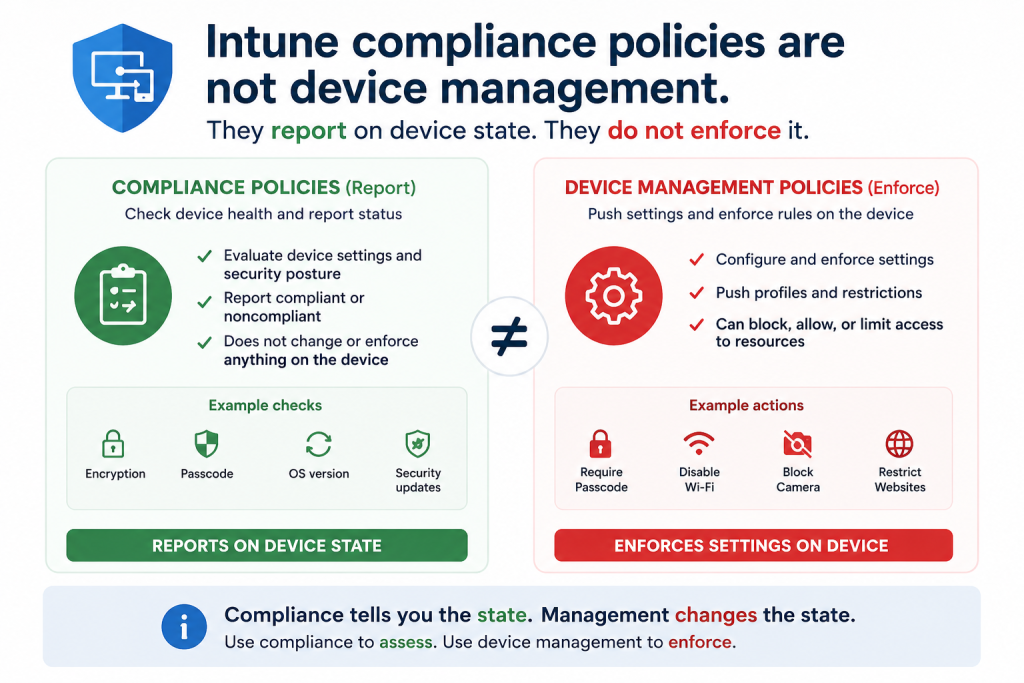
Most SMB admins deploy Intune, create a handful of compliance policies, and mark device management complete. The compliance policy checks whether BitLocker is enabled, whether the OS is up to date, and whether a PIN is set. When the answer is no, the policy flags the device. It does not fix it.
Four gaps separate reporting from enforcement:
1. Compliance policies are evaluated. Configuration profiles enforce. A compliance policy that requires BitLocker reports non-compliance when it is off. A configuration profile under Devices > Configuration actually turns it on. Both are required. Neither substitutes for the other.
2. Non-compliant devices retain access without Conditional Access. The compliance flag means nothing until a Conditional Access policy requires a compliant device for sign-in. Without that link, the device is flagged as fully operational at the same time.
3. Grace periods are left at the default. A compliance policy can allow a device days to become compliant before action. Admins rarely review the default and rarely know how long a flagged device keeps access before anything changes.
4. No remediation path defined. Flagging a non-compliant device is the start of a process most tenants never built. There is no profile to correct the state, no Conditional Access to restrict it, and no notification to the user. The flag sits in a report no one reviews.
What this means in practice.
A tenant full of compliance policies and no configuration profiles is a monitoring system with no actuator. It knows the device is non-compliant. It cannot make it compliant, and it does not stop the device from accessing company data. The dashboard shows red. Nothing happens. Management reads the green numbers and assumes the fleet is controlled.
Compliance without configuration is reporting without remediation.