Microsoft 365 Apps on Windows 10 stop receiving new features at Version 2608, and for most business tenants that point arrives no later than October 13, 2026. Many SMB owners have read that Office is supported on Windows 10 until 2028 and concluded the hardware refresh can wait. That conclusion is wrong.
The 2028 date covers security patches for a frozen build of Word, Excel, and Outlook. It says nothing about Windows itself, which left support on October 14, 2025. A Windows 10 seat now pays the full subscription price for software that has stopped improving on that machine, running on an operating system that only paid Extended Security Updates keep patched.
Are Microsoft 365 Apps still supported on Windows 10?
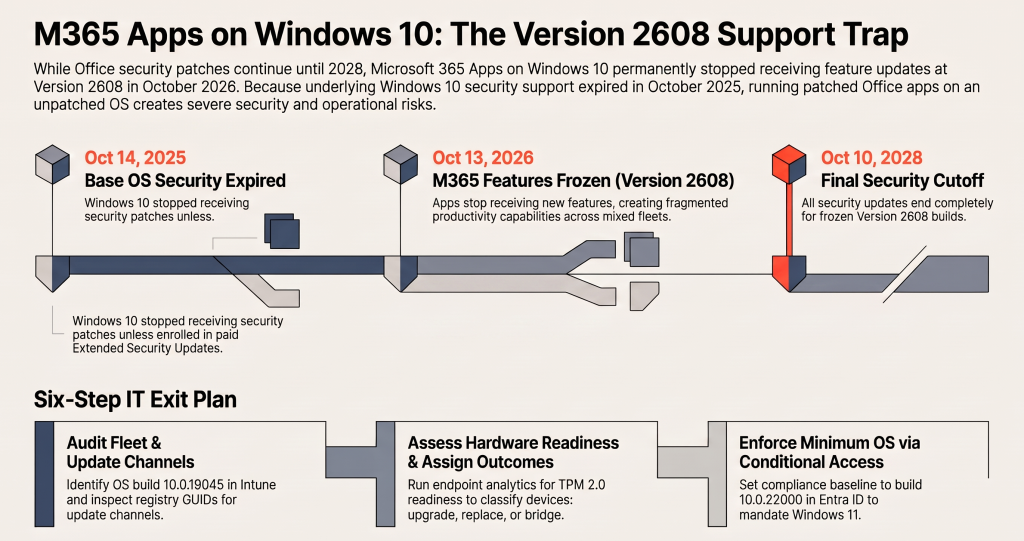
Microsoft 365 Apps on Windows 10 get feature updates only up to Version 2608, which reached Current Channel in August 2026 and Monthly Enterprise Channel on October 13, 2026. After that, devices receive security updates only, until October 10, 2028. Windows 10 itself lost security updates on October 14, 2025, unless enrolled in Extended Security Updates.
Nothing visibly breaks on the freeze date. Word opens, Outlook syncs, and users notice nothing, which is exactly why the change gets missed. In Microsoft’s words, devices will “remain on Version 2608, receiving only security updates until October 10, 2028” (Microsoft Learn). After that date, the apps receive no updates of any kind.
How the Microsoft 365 Apps on Windows 10 freeze works
Microsoft did not set one cutoff date. It set a cutoff version, and each update channel receives a given version on its own schedule. The published dates were August 2026 for Current Channel, October 13, 2026 for Monthly Enterprise Channel, and January 12, 2027 for Semi-Annual Enterprise Channel.
That leaves three separate clocks running on every Windows 10 PC:
- Office features: stopped at Version 2608.
- Office security patches: continue until October 10, 2028.
- Windows security patches: ended October 14, 2025, unless the device is enrolled in Extended Security Updates.
Most planning conversations collapse these into one date. The one that matters most for breach risk is the one that already passed.
What admins miss about the Version 2608 freeze
The January 2027 date is probably wrong for you
Admins running Semi-Annual Enterprise Channel noted January 12, 2027 as their deadline and moved on. That date predates a channel change. Under Message Center notice MC1274325, Microsoft unified Semi-Annual Enterprise Channel with Monthly Enterprise Channel starting with the July 14, 2026 Patch Tuesday release, and Semi-Annual devices now receive feature updates monthly on the same basis, as the Microsoft 365 Apps update channel overview now states.
Follow that through, and a Windows 10 device on Semi-Annual Enterprise Channel reaches Version 2608 alongside Monthly Enterprise Channel, on October 13. If the Windows 10 support article still shows January when you read it, treat that date as stale and plan against October. Most small businesses never chose a channel deliberately, which is why step 2 below reads it from each device instead of assuming.
Patched Office on an unpatched operating system
Office security updates through 2028 create a false sense of coverage. An attacker who lands on a Windows 10 machine without Extended Security Updates goes after the operating system: kernel flaws, local privilege escalation, network stack bugs. A fully patched Outlook does nothing about a Windows vulnerability that will never be fixed.
Commercial Extended Security Updates provide critical and important Windows security updates for eligible Windows 10 22H2 devices for up to three years after October 2025. Without enrollment, the device is unpatched, whatever the Office version string reports.
Support cases get closed, not solved
Microsoft’s stated position is direct. If a Microsoft 365 Apps problem reproduces only on Windows 10, support recommends moving to Windows 11 and closes the case. The Outlook profile corruption or add-in crash that appears only on the old fleet becomes your problem alone.
Your staff end up on two versions of Microsoft 365 Apps
After the freeze, a mixed fleet runs two versions of the same software inside one company. Windows 11 users keep receiving new capabilities every month, while Windows 10 users stay on Version 2608 behavior.
The cost shows up where nobody budgets for it. Training material, help desk scripts, and internal how-to screenshots stop matching half the staff. Policy settings Microsoft ships after Version 2608 target features that frozen clients do not have.
OneDrive keeps updating, which hides the freeze
The OneDrive sync client on Windows 10 22H2 keeps receiving feature, fix, and security updates through October 10, 2028. Users see an app that updates and folders that still sync, and assume the rest of the machine is current. It is not. Devices on Windows 10 builds older than 22H2 get neither the OneDrive runway nor Extended Security Updates eligibility.
What this means for the business
The cost of waiting is not zero. It is two versions of Microsoft 365 Apps to train and support, closed support cases, and a breach window that widens every month a Windows patch ships without your fleet. If you already suspect you are paying for Microsoft 365 features your staff never use, the Windows 10 machines are where that waste is now built in.
The hardware refresh is no longer a 2028 decision. It belongs in this quarter’s budget, because an app support date is not an operating system support date.
What to Change This Week
- Find every Windows 10 device. In the Microsoft Intune admin center, go to Devices > All devices and filter on OS version. Windows 10 22H2 reports as build 10.0.19045, and Windows 11 starts at 10.0.22000. License: Microsoft Intune Plan 1, included in Microsoft 365 Business Premium. Without Intune, run the script in step 2 through your remote management tool.
- Read the update channel and version on each device. Run this in PowerShell on the device or through your remote management tool. No license is required.
$c = Get-ItemProperty ‘HKLM:\SOFTWARE\Microsoft\Office\ClickToRun\Configuration’
[PSCustomObject]@{
Computer = $env:COMPUTERNAME
OSBuild = (Get-CimInstance Win32_OperatingSystem).Version
Channel = $c.CDNBaseUrl
Version = $c.VersionToReport
}
The CDNBaseUrl value ends in the channel GUID: 492350f6-3a01-4f97-b9c0-c7c6ddf67d60 is Current Channel, 55336b82-a18d-4dd6-b5f6-9e5095c314a6 is Monthly Enterprise Channel, and 7ffbc6bf-bc32-4f92-8982-f9dd17fd3114 is Semi-Annual Enterprise Channel.
- Confirm the tenant default channel. In the Microsoft 365 admin center, go to Settings > Org settings > Services > Microsoft 365 installation options. This requires the Global Administrator or Office Apps Administrator role.
- Check Windows 11 hardware readiness. In the Microsoft Intune admin center, go to Reports > Endpoint analytics > Work from anywhere. Devices that fail the TPM 2.0 or processor checks go on the replacement list. License: Intune Plan 1, with devices enrolled in endpoint analytics.
- Assign each device one outcome. Upgrade in place, replace, or enroll in Extended Security Updates as a bridge with a written exit date. Extended Security Updates without an exit date only defers the same decision at a higher cost.
- Enforce the cutoff. A compliance policy reports and does not block, as covered in Intune compliance policies report device state but do not enforce it. Create a Windows compliance policy in the Microsoft Intune admin center under Devices > Compliance with a minimum OS version of 10.0.22000, then require a compliant device in a Conditional Access policy under Microsoft Entra admin center > Protection > Conditional Access > Policies. License: Intune Plan 1 and Microsoft Entra ID P1, both included in Business Premium.
Run the Conditional Access policy in report-only mode for at least one week and review the sign-in logs before switching it on. Windows 10 devices still waiting for replacement lose access the moment it is enforced.